Change management in Digital Asset Management (DAM) is the work of helping people adopt new ways of working when a DAM system is introduced or changed. It matters because a DAM only delivers value when people actually use it. Launch day is an important milestone, but adoption is the real measure of success.
It is also the part of a DAM project that tends to feel the messiest, since it touches habits, culture, and technology all at once. The good news is that these challenges are rarely unique. They follow familiar patterns, and once you can identify them, the path forward becomes much clearer.
That idea shaped our latest Ask Me Anything webinar, which focused on change management in DAM. Attendees sent in questions ahead of time and throughout the session, and three AVP practitioners answered them. Together, they have guided DAM programs across tech, marketing, healthcare, cultural heritage, and large enterprise rollouts. This post summarizes the questions attendees asked and the perspectives our team shared in response.
Watch the full webinar
Change management in DAM: Ask Me Anything
Kara Van MalssenPartner and managing director
Pamela VisnerAssociate director of implementation services
Rachel WolfProject manager
Why do people resist a new DAM?
People resist change when they do not understand why it is happening, what is expected of them, or what they will get out of it. They also resist adoption when they are handed a new tool, pointed to vendor training, and left to figure out the rest on their own.
One of our panelists was candid about this. On the receiving end of a technology rollout, she described herself as the person most likely to say no. What changed her mind was understanding the reasoning behind the change, knowing what was expected, seeing what was in it for her, and having support when questions came up. Most of your users feel the same way, even if they don’t say it out loud.
When you are the one leading a change, it is easy to forget what it feels like to be on the receiving end of being told to change the way you work. That’s why good change management starts by stepping back into the user’s shoes.
It is also worth remembering that change in a DAM program isn’t limited to a new platform launch. Integrations with new tools, workflow updates, and new AI capabilities all ask people to work differently, and each one is a change to manage. For more on the AI side, see The DAM AI gap is real. Here’s how to close it.
How do you know if change management is working?
There is no universal set of change management KPIs. The right ones show three things: people have adopted the new system, it is working for them, and they are sticking with it instead of drifting back to old habits. What those look like depends on your organization, your users, and your reasons for change.
As our team pointed out during the webinar, the most common metric, logins, tells you very little on its own. A login does not show whether someone is using the DAM for their daily work or just stopping in to grab one file. A more complete picture blends two kinds of measures.
Quantitative measures
Downloads, searches, uploads, and time spent in the system. These come from system reports, but they need context to mean anything.
Qualitative measures
User satisfaction and how well the DAM fits each person’s end-to-end workflow. These rarely come from the system itself, so gather them directly through surveys, interviews, and regular check-ins with stakeholders.
Measure the before, not just the after
The KPIs leadership wants most are before-and-after comparisons. Say it took people two hours, on average, to find an approved asset before the DAM, and 30 seconds after. That is a powerful result, but only if someone knew it took two hours the first time around.
Our team has seen this gap often: organizations wanted productivity KPIs but never captured a baseline. The fix is simple pre-work.
Define the KPIs you plan to track.
Establish a baseline for each one before launch, especially any that need a before-and-after comparison.
Use discovery to collect it. A simple approach is to ask stakeholders during early requirements meetings how long their current tasks take.
Those baseline numbers also strengthen the case for investment. Our guide to getting DAM buy-in, role by role calls out the metrics various leaders will want to see before investing, and Building a DAM business case shows how to put it all together.
How do you get every department off shared drives and onto the DAM?
Start by making sure the DAM actually meets a genuine user need. No one adopts a system that does not fit their daily work, no matter how good the awareness campaign is. That means involving users early, learning their pain points, and checking back with them throughout the build.
The panel put it plainly: awareness and desire matter, but they sit on top of something more basic. If the system was not built around people’s requirements, they won’t use it. During the webinar, the team described a current AVP client that brings a large group of users into every stage of the project. It takes serious commitment, but those users will know exactly what’s coming when the DAM goes live. Our article on why DAM use cases are only as good as the humans involved goes deeper on this approach.
Sometimes the issue is that people simply can’t see the value yet. Project teams are often so close to the system that they forget others are coming to it fresh. Ask users to show you their current process and where it breaks, then show them, in their terms, how the DAM changes that.
Why shared drives are so hard to leave
Most people dislike their shared drive, yet they default back to it the moment something new feels unfamiliar. It’s the devil they know. Users have told us they would rather click through a five-level folder path than search by keyword or tag, simply because they have done it that way for years.
That habit is hard to break because moving to a DAM is often a complete shift in their mental model. Many DAMs are organized by metadata rather than folders, or show different folders depending on a user’s role. Some teams try to ease the transition by recreating their shared drive structure in the DAM. We have seen this fall apart quickly, because every team organized its folders differently, and no single structure feels familiar to everyone.
Post-launch support, so people have somewhere to turn while new habits and questions form.
A search experience designed around users.
How do you win over teams whose current process already works?
Find out what they are afraid of losing, show them clearly what they gain, and give them a genuine role in how the DAM is run. Teams that worry about losing control or flexibility, often creative teams, need to see the new system as something they help shape, not something done to them.
The panel raised a possibility that’s easy to overlook: maybe their process really does work, and the DAM lacks the tools to support it. Go back to their requirements. If the platform truly doesn’t help them work more efficiently, that is important information, not resistance.
The concern about control is often a governance question. Our panelists recommended giving those teams space to raise concerns, sharing ownership of the program, and discussing where they can keep flexibility, such as managing their own content or permissions. Our DAM Operational Model is a useful framework for defining those roles and responsibilities.
Answer “what’s in it for me?” for every group
If people feel they are losing something, they need a clear sense of what they are getting instead. One useful approach from the webinar is to think in layers:
What does the organization gain from this change?
How does this team or role contribute to that?
What does each person get out of it?
The answers won’t be the same for every team, brand, or role. A message that lands with marketing may fall flat with a creative studio. As one panelist put it, “it’ll be great when you can organize your stuff” won’t move anyone who feels organized already. Show people, don’t just tell them. Take them through the new workflow and let them see the difference for themselves.
The team also stressed that incentives should fit your culture. Some organizations respond well to a straightforward explanation of trade-offs. Others prefer recognition and rewards; our team has seen clients run “DAM user of the month” awards and team prizes for strong adoption. Any of these can work if it fits how your people already communicate. For a stakeholder-by-stakeholder view, see How to get DAM buy-in, role by role.
How should you train everyone from power users to occasional searchers?
Build training around roles and real use cases, then layer it so each person learns only what they need. Vendor documentation is a starting point at best, because it describes the platform in general, not the DAM your organization configured.
In our team’s experience, vendor materials rarely work as-is for user training. A configured enterprise DAM looks very different from the vendor’s generic version, and much of that documentation covers admin tasks most users will never touch. You would not teach an end user how to upload content if uploading is not part of their job.
Structure training in layers
The advice from the webinar was to start with what everyone needs to know, then add layers of functionality for the people who need them.
EveryoneSearching, downloading, and sharing approved assets.
ContributorsUploading content and editing metadata.
Power users and adminsAdvanced workflows, permissions, and system configuration.
People join only the modules that apply to them, so no one sits through training that has nothing to do with their work. If resources are limited, group users with similar tasks and build one training track per group.
Anchor every action in the bigger workflow
A button in isolation raises an obvious question: why am I clicking this? We have found that training works best when it walks through the full business process, then zooms in on each step. Show what happens in the DAM, what happens in adjacent systems, and what result each step produces. Then connect it to the moments in someone’s job when they will actually need it.
Offer more than one format
People learn differently, so give them options:
Visual guides with screenshots that point to exactly where to click
Adoption is never owned by one person. It works best as an ongoing partnership between IT or system administration and a business-side leader, and that partnership should continue for the life of the DAM.
The reason, as the panel explained, is that user needs change. The way someone works today won’t be the way they work in five years, so the DAM and the processes around it have to keep evolving. The business side stays close to users and spots those changes, while the system side reflects them in the platform. When IT owns the DAM alone, that connection to everyday business processes tends to weaken.
Change management does not end at launch
In the webinar, our team described implementation as a process that never really ends. The first cycle is the big push, but the work that made it succeed (listening to users, communicating clearly, training) still matters afterward. New features and tools keep arriving, and each one needs to be introduced, explained, and fitted into daily workflows.
The panel also raised a practical point about scope, recommending a minimum viable product, a first release with just the essentials, for the initial launch, as long as it is complete enough that people won’t reject it outright. The launch is when the biggest change happens, and it often surfaces needs nobody anticipated. Over-engineering for an imagined future can make the system harder to scale and waste time solving problems that never arrive. Our article Manage your DAM expectations covers how to set that first phase up for success.
What part of change management do organizations most often overlook?
The most overlooked part is timing. Most organizations start change management too late. It should begin as soon as there is a vision for change, well before implementation, and it needs visible support from leadership throughout.
Our team has seen the same pattern on many projects. Everyone agrees change management matters, but integrations, content migration, and configuration crowd it out. Then, close to launch, someone asks what the plan is for communicating with users. Starting early gives you time to prepare people and build interest in the new system.
The panel also made the case for starting even earlier. Bring users in when the vision first takes shape, before a platform is chosen. Ask what they need, test whether the vision works for them, and use their input to document requirements that guide selection. Then keep them involved through launch and beyond.
One more element came up repeatedly in the webinar: executive sponsorship that people can see. When leadership is not visibly driving the change, it becomes easy for people to work around the new system. Engage sponsors early and keep them present throughout. If you are not sure where your program stands on sponsorship, communication, and training, the DAM Implementation Success Predictor is a quick way to find the gaps.
What if you have to roll out a change quickly?
Fast change is harder, but the same principles still apply on a compressed timeline. Sometimes there is no time for a long runway, for example when a security issue requires a new system or process right away. In those cases:
Find the best available voice for your users. If confidentiality limits who you can involve, work with whoever is closest to the user community and can represent their needs.
Prepare everything you can in advance. Even if users get little notice, communications, training, and support materials can be ready the day they arrive.
Offer extra, direct support. Office hours and a clear way to reach the team give people confidence while they adjust.
Explain why. People asked to change quickly need to understand the reason and the urgency, as far as you are able to share them.
What does this mean for your DAM program?
A DAM can make assets rights cleared, easy to find, and ready to use, but only for the people who actually use it. Every asset that stays buried in a shared drive is one the organization paid to create and cannot fully put to work. Strong change management is what turns a DAM investment into a return: less time searching, less risk from using the wrong version, and assets that finally earn their keep.
The path forward comes down to a few practical steps:
Start early. Involve users as soon as there is a vision for change, before you choose a platform.
Build for genuine needs. A system that fits people’s daily work is the foundation of adoption.
Measure from a baseline. Define your KPIs and capture the “before” so you can prove the “after.”
Answer “what’s in it for me?” for every team, role, and brand, and show them rather than tell them.
Train by role and use case, in layers and in more than one format.
Share ownership for the long term. Pair IT with a business lead, and keep both engaged after launch.
Make sponsorship visible. People follow change that leadership clearly supports.
Frequently asked questions
What is change management in DAM?
Change management in Digital Asset Management is the work of helping people adopt new tools, workflows, and ways of working around a DAM. It includes involving users in requirements, communication, training, ongoing support, and measuring adoption over time.
What KPIs measure DAM adoption?
Useful DAM adoption KPIs combine system data, such as searches, downloads, and uploads, with qualitative feedback on user satisfaction. The most persuasive KPIs compare performance before and after launch, such as time to find an approved asset, which requires capturing a baseline first.
When should change management start in a DAM project?
Change management should start as soon as there is a vision for change, ideally before a platform is selected. Involving users during requirements gathering makes it more likely the final system meets their needs.
Who should own DAM adoption after launch?
DAM adoption is best owned jointly by IT or system administration and a business-side leader. That partnership should continue for the life of the DAM, because user needs and platform capabilities keep changing.
Is vendor training enough to drive adoption?
Vendor training is rarely enough on its own. It covers the platform in general, not your configured system or your workflows. Effective DAM training is built around user roles and real use cases.
Find your path forward
Change management is where many DAM programs succeed or stall. If you are planning a new DAM, AVP’s implementation services build adoption in from day one. If you already have a DAM that isn’t getting the use it should, our optimization services can help you find out why and what to do next.
A digital asset manager is the person who makes sure your creative, product, and archival content is organized, rights cleared, and easy for every team to find and use. If your teams are still hunting through shared drives, or asking “does anyone have the final logo file?” or “are you sure this is the right one?”, that’s a sign this role is missing, and hiring for it will fix it.
Section 01
Why does your team need a digital asset manager?
It may look like skipping this hire is an easy way to trim headcount, and for a while, it can even seem like it’s working. Riding the wave of a successful platform launch and training sessions, things may appear fine for a while, until everyone moves on to the next priority. Over time the problems caused by this unfilled role will surface as an underutilized platform, more search clutter, and more time spent tracking down rights than you had before the DAM even existed.
Here’s a version of the story that plays out more often than it should. An organization invests in a DAM platform, gets it configured, migrates the assets over, and then realizes a few months in that the system doesn’t run itself. Metadata drifts. Nobody’s enforcing naming conventions. Rights and licensing information goes stale. The platform that was supposed to fix the problems becomes the face of the problems.
Buying a DAM and staffing a DAM are two separate decisions, and only one of them got made.
Every team we talked to that has posted this role was solving the same underlying problem: a growing library of photography, video, CAD files, and marketing assets that had outgrown shared folders and departmental knowledge. Some had thousands of assets. Others had millions, spread across departments and regions.
Without dedicated ownership, three things tend to happen
These are the same three things a working DAM is supposed to guarantee. They’re the first to slip when no one owns them.
01
Assets aren’t rights cleared
Usage rights, licensing, and expiration dates get tracked informally, if at all. That’s legal exposure, not just a filing problem, and it can be a financial one. An expired license or misused image can bring fines, legal fees, and damage to the brand.
02
Assets aren’t easy to find
Teams recreate content that already exists because nobody can locate it, or they Slack around asking who has the good version.
03
Assets aren’t ready to use
Wrong format, wrong crop, missing approvals. Someone downstream has to clean it up before it’s usable.
A digital asset manager is the person accountable for closing these gaps. If you skip this hire, you don’t avoid the cost of these problems, you just temporarily hide them. The cost shows up later, as wasted platform investment, frustrated teams, and a library that needs a bigger cleanup than the one you started with.
Often the real question isn’t “who do we hire?” It’s “what’s actually broken?” Do you have a platform problem, a process problem, or both? That’s worth answering before the job description gets written.
DAM systems rarely fail because of the platform. They fail because no one is in place to do the heavy lifting of governance and change management once the system is live. Success isn’t a live DAM with people logging in. Success is end users working more productively than they did before, with confidence that the asset they’ve grabbed is the right one and rights cleared.
How AVP can help
Not sure if the issue is your platform, your process, or both? AVP’s services can help you assess what you have today and, if it isn’t working, find the right solution to replace it.
At a high level, the role comes down to four things.
01
Making content findable
Setting the metadata standards, taxonomy, and naming conventions that let anyone on the team locate an asset, not just the person who uploaded it.
02
Keeping content usable and rights cleared
The full asset lifecycle from intake through archive, plus the rights and licensing tracking that keeps an expired or unlicensed asset from ever making it into a campaign.
03
Owning the systems behind the content
The DAM platform itself, how it connects to the other tools your teams rely on, and what happens when assets or systems change and need to move.
04
Making sure the system gets used
Training, documentation, and reporting on adoption and system health, so the investment doesn’t quietly go to waste.
For what this looks like translated into an actual job posting, see the sample description below.
Section 03
Sample digital asset manager job description
The question we hear most often isn’t “what does this role do,” it’s “can you just send us something we can post.” Here’s a generic starting point, built from the patterns that show up again and again across real postings. Adjust anything in brackets to fit your organization, platform, and stage.
Digital Asset Manager
Copy and adapt
Role summary.[Company] is looking for a Digital Asset Manager to own the organization, governance, and workflows behind our growing library of digital assets, including [photography, video, product files, marketing materials]. This is a foundational role that improves how [Creative, Marketing, Product, Sales, Ecommerce, IT] find, use, and trust the content they rely on every day.
What you’ll do
Own and administer the digital asset management (DAM) platform, including user permissions, workflows, and day-to-day operations
Build and maintain metadata standards, taxonomy, and naming conventions so assets are consistently tagged and easy to find
Manage rights, licensing, and usage restrictions, partnering with legal, and flag expirations before they become a legal or financial risk
Own the asset lifecycle from intake through archive, keeping the library accurate and current
Scope and manage integrations between the DAM and other systems, such as [a CMS, PIM, creative tools, or project management platforms]
Lead or support data migration whenever assets or systems change
Train teams across the organization and build documentation that drives adoption, not just access
Serve as the go-to resource for business users and outside partners, such as agencies or vendors, navigating file types, formats, and metadata requirements
Track usage, adoption, and metadata completeness, and report on system health to leadership
Serve as the internal subject matter expert on digital asset management best practices
What you bring
[X+] years of experience managing a DAM platform or a large library of digital assets
Experience building metadata schemas, taxonomy, or controlled vocabularies
Comfort partnering across departments, including legal, IT, creative, and marketing
Experience with [your specific platform, if you already have one, such as Bynder, Canto, Aprimo, Widen, or Brandfolder]
Strong written and verbal communication skills, with the ability to translate technical process for non-technical teams
Nice to have
Experience with a PIM system or ecommerce content operations
Experience with data migration or system implementation projects
Familiarity with AI-assisted tagging tools or content authenticity standards
If you’re not sure how much of this list applies to your team yet, that’s worth answering before the posting goes live, not after someone’s hired.
Section 04
What skills and experience should you look for?
Across the roles we reviewed, from consumer brands to large tech companies to museums, a consistent skill set shows up again and again, beyond what’s in the sample description above.
01
Systems and standards thinking
Look for candidates who’ve built or maintained metadata schemas, controlled vocabularies, and taxonomy frameworks, not just used a DAM as an end user. For a deeper look at what this work actually involves, see The Expert Guide to Establishing a Metadata Strategy for Your DAM.
02
Governance and rights management
Especially for regulated or brand-sensitive organizations, you want someone comfortable partnering with legal or compliance on licensing, usage rights, and audit trails. This is increasingly extending to accessibility too, making sure the system and its content work for internal and external users with different needs, not just rights compliance in the narrow sense.
03
Cross-functional collaboration
This role sits between creative, marketing, product, sales, and often IT and legal. Candidates should be able to translate what each team actually needs into a system that works for all of them. For some organizations, that list is bigger than it first looks: external partners, press, or agencies who need access too, or teams spread across multiple countries and time zones. Worth asking during the interview whether that wider picture applies to your organization.
04
The asset help desk side of the job
A lot of this role is reactive, day-to-day support, not just governance from a distance. Business users don’t always know the difference between file types, or how to navigate the taxonomy to find what they need. When a new agency or vendor comes on board, someone has to walk them through uploading assets in the right format with the correct metadata, whether that’s entered directly in the system or embedded in the file’s IPTC fields. Some library science professionals describe this as being a DAM reference librarian. Look for candidates who are comfortable being the ongoing, patient point of contact for these questions, not just the person who built the system once and moved on.
05
Understanding integrations, not just building them
A common mistake is treating an integration as a technical checkbox: connect the DAM to the CMS, done. Stronger candidates ask a different set of questions first. What’s the actual goal of this integration? What does it need to accomplish? Do we need one at all, or is there a simpler fix? Look for someone who can scope what an integration should look like before committing your team to building it, not just someone who can wire two systems together.
How AVP can help · Strategize
Planning how your DAM should connect to the rest of your tech stack is exactly what AVP’s Strategize service is built for. We look at the systems that connect to your DAM, how assets and data move in and out, and turn that into a practical roadmap, so your team scopes the right integration instead of just building the first one someone asks for.
06
Data migration experience
Whether you’re consolidating platforms, replacing a legacy system, or moving out of shared drives for the first time, migrating assets and their metadata without losing information is its own skill, distinct from day-to-day platform administration. Ask candidates to walk you through a migration they’ve run and what went wrong along the way.
How AVP can help · Ignite
AVP’s Ignite service covers DAM implementation end to end, including data migration, so your new hire isn’t rebuilding your asset history from scratch on top of everything else.
07
Platform and vendor management
Whether it’s Bynder, Canto, Aprimo, Orange Logic, AEM, or something else, look for experience managing a vendor relationship, not just clicking through a tool. That includes upgrades, integrations, and troubleshooting. For some organizations, this also means owning the vendor contract and budget directly, not only the technical side of the platform, so it’s worth clarifying upfront how much of that ownership sits with this role.
08
Measuring and reporting on system health
A DAM that nobody reports on tends to drift. Look for candidates who can define and track things like adoption rate, search performance, and metadata completeness, and who are comfortable presenting that to leadership, not just to their own team.
How AVP can help · Elevate
If your DAM already exists but isn’t delivering what it should, AVP’s Elevate service assesses your system, workflows, metadata, governance, integrations, and adoption to find out what’s working, what isn’t, and where the opportunities are.
09
Change management
Launching a platform is the easy part. The harder, ongoing work is getting teams to actually change how they operate, adopting new naming conventions, trusting the system over their own folders, giving up the workarounds they built to survive the old way of working. This is where most DAM programs stall, not in the implementation, but in the months after, when there’s no one left driving that behavior change. Look for candidates who can talk concretely about a time they got a resistant team to change how they worked, not just candidates who can administer a tool.
10
Training and adoption
A DAM only creates value if people use it. Strong candidates have built onboarding materials, run training sessions, and measured adoption, not just launched a platform and moved on.
11
AI-assisted workflows, and AI trust
AI shows up in DAM work in three distinct ways. They’re related, but they’re not the same skill, so ask candidates which of these they’ve actually worked on.
01
Efficiency
Using AI for metadata suggestions, auto-tagging, and content classification. That’s becoming a baseline expectation, not a nice to have.
02
Trust
As AI-generated content becomes more common, some organizations now need to track content authenticity and provenance, proof of what’s real versus what’s been AI-generated or altered, alongside the usual rights and licensing data.
03
Agents
AI agents are starting to query, retrieve, and act on assets directly. Metadata and permissions need to be structured cleanly enough for a machine to interpret correctly, not just a person browsing manually.
A DAM with inconsistent tagging isn’t only harder for people to search, it becomes unreliable for any AI agent trying to use it.
If content authenticity and AI are new territory for your team, AVP’s Explore service helps you prototype and test emerging approaches, including AI, before committing to a long-term solution.
Section 05
How to adapt the sample job description for your team
The sample above is a starting point, not a finished posting. A few things worth deciding before you publish it.
Growth path. This role often expands into people management or platform strategy as the library scales. At larger organizations, this isn’t always a future step: supervising a specialist or coordinator is sometimes part of the role from day one.
Preservation expectations. If assets need to remain usable and intact for years or decades rather than just staying organized for current use, common for archives, museums, and other collections-focused organizations, say so explicitly.
Scope of ownership. Which platform, how many assets, which departments it touches. Vague scope is one of the fastest ways to end up interviewing candidates who aren’t actually a fit.
Section 06
How do you know a candidate is ready for the role?
Ask them to walk you through a messy library they’ve inherited
The strongest candidates will talk about all four of these without being prompted.
System and standards
How they assessed the current state before changing anything
How they built, or would build, a taxonomy that reflects how your teams search, not a generic template
Rights and people
How they handled a rights or licensing gap they found
How they got a skeptical team to actually adopt the new system
If they can only talk about the platform’s features and not the people and process around it, that’s worth a follow-up question.
FAQ
Common questions about the digital asset manager role
What is a digital asset manager?
A digital asset manager is the person who owns the organization, governance, measurement, workflows, and continuous improvement behind an organization’s digital content, including metadata, taxonomy, rights and licensing, and the platform that stores it all. Their job is to make sure assets are rights cleared, easy to find, and ready to use.
What does a digital asset manager do?
Day to day, this includes setting metadata standards and taxonomy, managing rights and licensing, running the asset lifecycle from intake through archive, administering the DAM platform, gathering, analyzing, responding to and reporting on metrics and trends, and training teams to actually use the system. See the full breakdown above.
How do you become a digital asset manager?
There’s no single path in. Candidates come from creative operations, library and information science, marketing technology, and archives or museum collections work. What matters more than the degree or job title on a resume is direct, hands-on experience with metadata, taxonomy, and governance at scale, which is why internal moves from adjacent roles such as creative operations, digital marketing, and archives are common. People management is a plus.
Do you have a sample digital asset manager job description we can use?
Yes, see the box above. Treat it as a starting point and adjust the bracketed sections for your platform, departments, and stage.
What’s the difference between a digital asset manager and a DAM administrator?
A DAM administrator typically focuses on the technical side: platform configuration, permissions, and integrations. A digital asset manager usually owns that plus the strategy, governance, and cross-team adoption around it. Many organizations combine both into one role, especially at a smaller scale.
Do we need a digital asset manager if we already have a DAM platform?
A platform without ownership tends to drift back into disorganization; some people refer to it as their content dump. The digital asset manager is what keeps taxonomy, rights, and quality consistent, ensuring content is trustworthy and findable as the library grows.
How is success measured in this role?
Common measures include adoption rate, search performance, audit compliance (the percentage of assets with complete, accurate metadata and valid rights), and reduction in duplicate or outdated content.
The takeaway
Hiring the right person is necessary, but it isn’t sufficient
A digital asset manager turns a content library into an asset that actually earns its keep: rights cleared, easy to find, ready to use, trustworthy. If you’re writing the job description, start with the business problem you’re solving, not just the software you’re using. If you’re evaluating candidates, look past platform familiarity and ask how they think about governance, integrations, migration, and the teams they’ll be serving.
A new digital asset manager handed a messy library, an undefined mandate, and no support or authority tends to spend their first year just staying afloat instead of building anything lasting. The transition, the training, the governance model, the change management, that’s often exactly where DAM programs stall, even with a strong hire in place.
A platform stores your assets. A person makes them worth storing.
Whatever stage you’re at, there’s a service built around it
Figure out which platform is right for you, implement and migrate into a new system, get more out of what you already have, plan how DAM fits your broader tech stack, or explore what’s next with AI.
Getting a digital asset management (DAM) project approved rarely comes down to one yes. It comes down to several, from several different people, each asking a different question. If you’ve heard “we already have a DAM platform,” “we just bought one,” or “can’t we just use a shared drive,” the problem usually isn’t that leadership doubts the value. It’s too often that no one has answered the specific question each stakeholder is actually asking.
This is a practical guide to those questions, organized by who’s asking them, so you can walk into any conversation, with any role, already knowing what they need to hear.
01
Why does DAM buy-in stall even when everyone agrees it’s needed?
Buy-in stalls because the people who feel the daily pain, missing files, unclear rights, duplicate assets, are rarely the people who approve the budget to fix it. That gap between who feels the problem and who signs off on the solution is where most DAM projects get stuck.
It’s made worse by a common misunderstanding: a lot of teams assume DAM software is a marketing tool, full stop. Ad versions, campaign folders, brand assets. If that’s the only framing anyone’s heard, teams solving a different problem, like managing 3D files, engineering assets, or research archives, will conclude a DAM isn’t for them. One organization spent over a year running focus groups and evaluating alternatives, project management tools, engineering version-control software, before landing back on the obvious answer: “I guess we do need a DAM.” The delay wasn’t a lack of pain. It was a messaging problem.
Related resource
For a structured way to identify who should be in the room before that happens, see AVP’s guide to assessing your organization’s DAM needs, which includes an eight-role stakeholder-identification framework.
02
Who’s actually in the room?
A DAM decision usually touches four groups, and each one is protecting something different.
Leadership isn’t asking whether a DAM is a good idea. They’re asking whether this DAM, this year, beats every other line item competing for the same budget. They need to see the cost of the current workflows, time lost searching, assets recreated because no one could find the original, risk from expired or unclear usage rights and the damage that can cause a brand, set against a clear, specific outcome.
What helps here:
A short, plain-language business case that ties the investment to risk reduction and time saved, not features
A named executive sponsor who can speak for the project when you’re not in the room
A connection, even a rough one, between the DAM and revenue or speed to market. In growth-focused organizations, “this helps us work better” rarely moves a budget on its own. “This gets us to market faster” often does.
Real numbers from your own team wherever you have them, and a clearly marked placeholder where you don’t yet
Examples of numbers to gather
Time-based
Average hours per week, per person or team, spent searching for assets
Time lost when no one can find the “source of truth” version
Time spent recreating or reshooting content that already exists somewhere
Cost-based
Stock or licensing spend that could’ve been avoided by reusing owned assets
Cost of a single reshoot, framed as “reshooting next year costs $X unless…”
Vendor or freelance spend tied to recreating assets
Risk-based
Dollar amount tied to past license violations or expired-rights incidents
Number of assets without clear rights metadata, as a proxy for exposure
Volume and scale
Number of duplicate or near-duplicate assets in current storage
Percentage of produced content that goes unused and unfindable a year later
Budget conversations also tend to climb a chain: you make the case to a director, who carries it to a senior director, who carries it to a VP, sometimes higher, depending on the price tag. The bigger the ask, the more it needs to serve more than one team. A tool pitched as solving one group’s problem gets a harder no than one framed as helping the entire company work toward its goals. Anticipate the pushback, what’s the ROI, why do we need this at all, before you’re standing in the room answering it live.
A real result can do more than a projection. One AVP client, the New York Public Library, used a stakeholder-backed case like this to secure an immediate funding increase of over $1M, along with a much larger multi-year commitment. Numbers like that came from a clear case, not a bigger deck.
IT isn’t pushing back to be difficult. They own uptime, security, and everything that breaks at 2am. Their real question: does this fit cleanly into what we already run, or does it become one more system to patch, secure, and explain during an audit?
What helps here:
Early answers on integrations, API access, and how the platform handles access controls and audit trails
A straight answer on data migration, including what happens to existing folders, permissions, and file history
If you’re looking to migrate, clear answers on why the existing solution isn’t working for the business, not just your team
A seat at the table before the decision, not after it
Bringing IT in early, even informally, tends to shorten this conversation more than any amount of documentation later on.
Internal teams across multiple brands or departments: whose way of working wins?
If your organization spans multiple brands or business units, this question gets sharper. Each team has its own workflows, naming conventions, integration requirements, and sense of what “done” looks like. The real question isn’t “do we need a DAM.” It’s “will this force my team to work someone else’s way?”
The most useful answer tends to be: not all at once. A shared foundation, one taxonomy, one set of governance rules, one rights framework, with room for each team to configure its own views, folders, and approval steps tends to land better than a rigid structure applied everywhere on day one. A phased rollout, team by team, gives each group a chance to see the shared system work before they’re asked to fully adopt it.
This also heads off a specific objection: “we already have something.” Sometimes that something was built for one team’s needs and doesn’t hold up for anyone else, rigid metadata fields that only make sense for one kind of asset, or a structure nobody outside the original team had input on. The fix isn’t arguing the existing tool is bad. It’s showing, concretely, where it doesn’t fit the work other teams actually do.
This group is most likely to feel unheard, and most likely to quietly work around a new system if their concerns go unaddressed. Their question is simple: will this slow me down while I’m already busy? They’re not asking about ROI. They’re asking whether they’ll still be able to find the file they need by Friday to meet their deadline.
What helps here:
Involving a few actual end users in requirements gathering, not just their managers
Showing, concretely, how a common task, finding the current logo, confirming an asset is cleared for use, uploading a new file, gets faster, not slower
Being honest about the learning curve, and pairing the rollout with real training, not just a link to a help doc
The moment that actually changes minds
Slides make the case. A live demo tends to close it. Load in a real batch of assets, tag a handful, and search for something the room already knows is hard to find today, or build out one process or workflow that shows how the platform will increase your team’s speed. Watching a result appear in seconds does more than any projection slide. It’s not magic, it just makes the “so what” visible instead of theoretical. Pair that moment with an honest note: the system doesn’t organize itself. Someone, increasingly an AI-assisted tool working alongside a person, still has to do the tagging work up front.
That last point matters more than ever. AI search and recommendation tools are only as good as the metadata behind them. A DAM full of inconsistent, incomplete metadata will hand back inconsistent, incomplete answers, from your team and from any AI layered on top. It’s the same story as always, told with new urgency: assets that are easy to find and ready to use only get that way because someone made the rights, structure, and metadata clear first.
When leadership says “we already have a DAM” or “we have shared storage”
This objection almost always means one of two things: the current tool was never fully adopted, or it’s solving a different problem than the one you’re describing. Shared drives and general storage are, at their core, storage. A DAM manages rights, versioning, metadata, and controlled access at scale, in a way storage tools weren’t built to do.
The most direct response is usually a short, live comparison: pick one real task, finding the latest approved product image with rights confirmed, and show how long it takes today versus how it could work. That’s often more convincing than any slide.
Every one of these conversations, leadership’s budget question, IT’s integration question, the multi-team alignment question, the end user’s workflow question, comes back to the same three things:
01
Rights cleared. Assets are safe and legal to use, and everyone can see that at a glance.
02
Easy to find. The right file surfaces when someone needs it, without a chain of emails.
03
Ready to use. The right format, the right context, no cleanup required.
When you frame each stakeholder’s question back to one of these three, the project starts to read less like a system purchase and more like what it actually is: a way for your assets to finally earn their keep.
05
Getting the right people to the table
None of this requires convincing everyone alone, or getting every answer perfect on the first try. It usually just takes making sure the right people are in the room, with a chance to ask their real questions and get real answers, and someone willing to keep having the conversation until it lands.
If you’d like a second set of eyes on your business case, or help facilitating that conversation across leadership, IT, and your internal teams, AVP can help.
FAQ
Common questions on DAM buy-in
What is DAM buy-in?
DAM buy-in is the agreement of every group that can slow or stop a digital asset management project: budget-holding leadership, IT, internal teams, and end users. Getting it means answering each group’s specific question, not repeating one pitch to everyone.
Who needs to sign off on a DAM purchase?
Most organizations need agreement from a budget-holding leader, IT (for security, integration, and infrastructure), and the internal teams who’ll use the system daily. Organizations with multiple brands or business units should add a stakeholder from each group to align on shared versus team-specific needs.
What if leadership thinks we already have this covered?
Ask what problem they think is already solved, then show the specific gap, rights tracking, findability, or governance, that their current tool or process doesn’t address.
How long does it usually take to get buy-in?
It varies widely. Persistence, and finding one advocate at the right level who genuinely understands the value, tends to matter more than any single pitch.
How do we get ownership settled, not just budget approval?
Buy-in and ownership are related but different. Budget approval gets you the tool. Clear ownership, who governs metadata, who approves new users, who maintains taxonomy, is what makes it stick. AVP’s DAM Operational Model self-assessment guide covers governance and ownership directly.
Find the right fit for your organization.
Get a second set of eyes on your business case, or help facilitating the conversation across leadership, IT, and your teams.
The 2023 State of Digital Asset Management report by Brandfolder + Demand Metric found that 77% of study participants were satisfied with their digital asset management (DAM) solution when deployment was completed quickly. However, in the rush to join this satisfied majority, many companies find themselves adrift in a sea of digital chaos.
Picture a company drowning in its own digital creations. Valuable assets are being lost in a haze of disorganization, resulting in missed opportunities, misuse, and drained resources. The decision to adopt a digital asset management system ignites hope across the organization. Still, eagerness for swift deployment often clashes with reality. The pursuit of rapid implementation and excessive features can overshadow the genuine needs of users, resulting in low adoption rates and a disappointing return on investment.
Successfully navigating this scenario hinges on a focused DAM strategy. By prioritizing user needs, organizations can plot a course towards a DAM solution that not only achieves swift adoption but also ensures a clear return on investment and a scalable future. Let’s explore how to set these priorities and approach your DAM initiative with confidence.
Why is a digital asset management strategy needed?
A DAM strategy is a guiding light, providing a path to meaningful outcomes. It ensures your energy, resources, and time are focused where they truly matter, preventing wasteful detours that could jeopardize stakeholder support and trust.
Digital files—images, audio, videos, graphics, presentations, documents, and more—are like any other form of data. They can be assets, an annoyance, and or even a liability to your organization. As assets, they are resources that hold enduring value. Yet, it’s not just the files themselves, but also the accompanying metadata that gives them purpose. Think of a photo: knowing who is in it, and where and how you can use it is just as important as having the jpg. This fusion of media, metadata, and the right to reuse sets them apart as assets, not just files.
But turning digital files into digital assets requires investment—technology, staffing, processes, policies, governance—the works. This investment should be strategic, focused where it packs the most punch and sets the stage for scalable growth.
So, when does a DAM strategy matter? Anytime you face hurdles in finding, using, or safeguarding digital assets. Think of when:
Your asset collection makes finding files feel like searching for a needle in a haystack.
Multiple departmental DAMS beg for unity under an enterprise DAM software.
Your legacy DAM software no longer keeps up with your evolving needs.
Your current DAM setup needs expansion or optimization.
These scenarios aren’t just inconveniences. They lead to inefficiencies, frustration, misuse, and needless duplication. This is where your DAM strategy comes in. It ensures your energy and resources are channeled into solving real problems, ensuring a meaningful payoff from your investment.
What is a digital asset management strategy?
Strategy is problem-solving. It is how you overcome the obstacles that stand between where you are and what you want to achieve.
Richard Rumelt
A digital asset management strategy is an organization’s planned response to the challenge of needing to organize, secure, and deliver digital assets to the users that need them, now and in the future.
More specifically, a digital asset management strategy identifies priorities so you can put resources where they will have the most impact. To state the obvious — you can’t do everything at once. A DAM strategy will tell you where to start, where to go next, what to put on the back burner, and what success looks like. Good strategy is as much about what you won’t do as it is about what you will do.
Our approach? Put users first. A user-centered DAM strategy centers on understanding and addressing user needs, and developing a cohesive response that will effectively address those needs.
Ready to dive in? Let’s develop a strategy that responds to your organization’s unique needs and goals.
What does a digital asset management strategy consist of?
Our approach to DAM strategy is rooted in the framework developed by Richard Rumelt and described in his book,Good Strategy Bad Strategy: The Difference and Why It Matters. Rumelt emphasizes that good strategy is simple. It consists of a diagnosis of the challenge that you are responding to, a guiding policy that describes the approach you will take to responding to the challenge, and a set of coherent actions designed to carry out the guiding policy.
We can adapt this framework to data and digital asset management this way:
The diagnosis is the identification of the problem an organization has with digital asset management, use, and delivery. Specifically, the diagnosis details what impact this issue is having on people (e.g., users waste time looking for assets, assets are misused)
The guiding policy is that a use-case centered approach will be taken to solve these challenges.
The coherent actions are the key areas of investment that you will make to solve the challenge and meet users’ needs.
Using this framework, a user-centered digital asset management strategy can be structured as follows:
Challenge: A clear identification of the problem that the DAM strategy is responding to. The goal of this statement is to align stakeholders on what you are solving for, and to guide prioritization.
Use cases & data: Prioritized and sequenced high-level digital asset use cases that identify practical applications of asset use, as well as the assets and metadata that are needed to enable those use cases.
Initiatives & actions: A summary of key investments and actions that will enable the guiding use cases, including: data quality remediation efforts, technology initiatives, and enablers such as governance, process, people and continuous improvement.
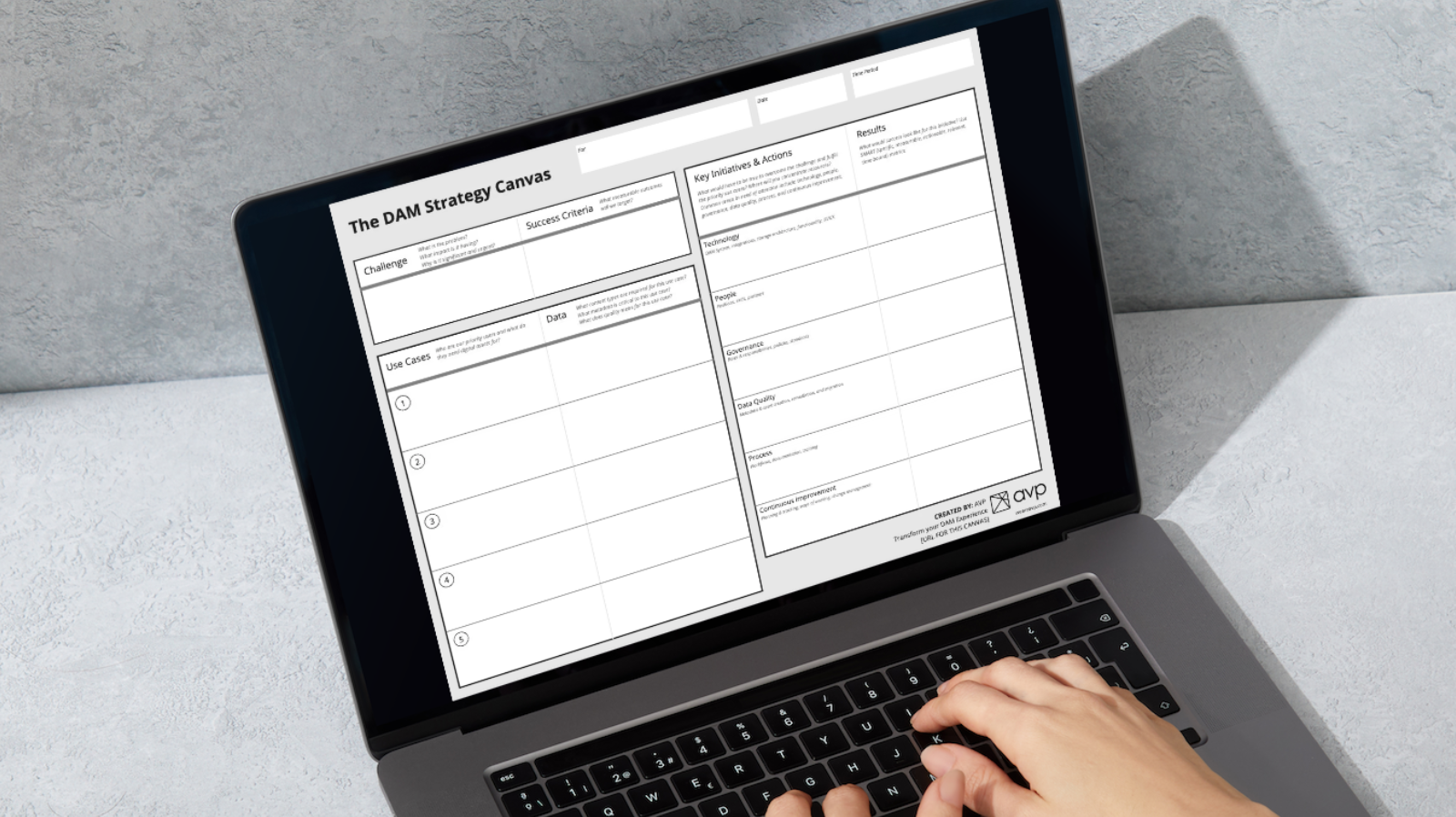
We have developed a DAM Strategy Canvas to help you iteratively capture your ideas along the way. Throughout this guide, we will point out where and when to populate the different sections of the canvas.
Steps to developing a digital asset management strategy
We suggest building your DAM strategy in this order:
Agree on the problem: Align stakeholders around the key challenge, and ensure alignment with the broader organizational strategy.
Assess user needs: Learn from priority users about their specific needs and requirements.
Develop use cases and data requirements: Document priority use cases that will drive the DAM strategy. Identify and document the associated data needs for each use case.
Conduct a data quality, technical, and operational gap analysis: Assess the data, technology, and operational landscape and determine what investments will be needed for success.
Prioritize key initiatives and actions: Identify and prioritize initiatives based on an understanding of data quality, dependencies, and technology and operational resource needs.
Define success: Identify the key metrics that will indicate that you have successfully solved the problem
Communicate, execute, and iterate: Ensure transparency, foster buy-in, support change management, and be ready to adapt.
Let’s dive into each of these steps.
1. Agree on the problem
Aligning stakeholders around the identified digital asset management challenge is a crucial first step in developing a successful DAM strategy. Gaining clarity on the problem to be solved will help focus subsequent efforts on a clear objective. Articulating the problem will also aid in presenting the business case for proposed investments. The problem should be significant enough to necessitate a strategic response.
To start, explore the need for an improved DAM solution within your organization. Engage stakeholders from different departments and levels of seniority to gather diverse perspectives and insights. These stakeholders can articulate how digital asset problems impact the business and provide insights into opportunities, resources, and constraints, especially budgetary concerns.
💡Tip!
Stakeholder Interviews 101 by the Nielsen Norman Group offer excellent tips on planning and conducting this type of interview.
By examining the issue from various perspectives, you can identify common themes and begin to coalesce around a top concern.
Be careful at this stage to focus only on the problem, not potential solutions. And don’t bake solutions into problem statements. For example: “We need DAM software” is a solution, not a problem. “It is taking people days to find the right asset, causing us delays to campaign timelines” is a problem.
As you narrow down the problem, it can be useful to articulate it using a Situation-Complication-Question framework. First, describe the situation — what is the problematic thing happening? Next, add in the complication — why is this happening, and what are the stakes? Finally, frame the challenge as a question — how might we resolve the situation given the complication?
Once key stakeholders align on the diagnosis and framing of the problem, populate the Challenge section of your DAM Strategy Canvas.
2. Assess users’ needs
The next step in building your digital asset management strategy is to identify and prioritize key digital asset use cases, and the data that are required for those uses to be successful.
Start by taking a deep dive into exploring users’ needs. First, identify and prioritize the users and stakeholders who rely on digital assets and are most affected by the problem you are working to solve. Seek to understand the situation from their point of view. Conducting user interviews allows you to empathize with users and gather insights on their challenges, while helping create further alignment and fostering buy-in.
Prepare an interview discussion guide that lists key topics you will want to learn about from your interviewees, including the use cases they need digital assets for, the types of assets they need, and the information accompanying the assets that are important.
💡Tip!
While you are talking to users, press for some hard numbers on how much time they spend searching for assets or money they are spending recreating and managing digital assets now. This qualitative information can be used to measure ROI against later and demonstrate the impact of the digital asset management solution.
Record and take notes during user interviews to help develop use cases and requirements in the next step.
3. Prioritize use cases and data requirements
Once you have completed user interviews, synthesize the results to look for recurring pain points, common requests, and top priorities. The results of this exercise will help you identify:
The priority use cases your digital asset management program should serve
What digital assets are most important to users
What metadata are most important for search, browse, and use of digital assets
One way to synthesize your findings is to do an affinity mapping, or clustering, exercise. First, highlight any key findings from notes or transcripts. Next, put these highlights on sticky notes (one finding per note) then add these to a physical or virtual whiteboard. Reorganize notes into clusters around common themes, then label the cluster of sticky notes.
In the example above, each color note represents a different user. In the Use Cases box, we have one cluster about quickly finding product images for marketing campaigns, and another about 3D asset versions. The Data Needs box shows one cluster shows where multiple people have said that rights/usage information is important to them, and another where two people indicate that the product ID or SKU is important. When multiple people ask for the same thing, these are candidates for prioritization.
Be sure to include sections of your affinity map for:
Use cases
Data needs (including required files, formats, and metadata)
Technology and functional needs
Use Cases
Your next goal is to identify the highest priority digital asset use cases that the strategy will focus on. Use cases should be high level, simple, and clear. They should identify who the user is, what they want to do with digital assets, and why. As a bonus, include the frequency of use.
Here is a simple example use case: “Marketers need quick access to brand assets every day in order to develop campaigns about our products.” This statement is concise, it identifies the user, it describes what they need assets for, and how frequently. Your use cases can be more detailed than this, but don’t make them overly complex.
Once you have sketched out the key use cases, sequence them according to priority. This will be the order in which you will start to build your DAM solution.
The key is to remember — and to clearly communicate to all stakeholders — that these foundational use cases are more than solutions for specific user groups. You will build capabilities for these use cases in a way that also addresses the needs of many other users, both current and future.
Prioritizing use cases requires weighing several factors around need, impact, and feasibility. An impact-effort mapping exercise can be helpful at this point. Start by creating a two by two grid where one axis is Impact and the other is Effort. Plot your use cases on the grid by considering them relative to one another.
The use cases that land in the High Impact / Low Effort quadrant are probably your first priorities, followed by High Impact / High Effort. Those that fall into the Low Impact area of the grid should not be part of your digital asset management strategy at this stage.
Once you have agreement on the top use cases and their priority order, populate the Use Cases section of your DAM Strategy Canvas.
Data Requirements
Once you have settled on the priority use cases, determine the corresponding data (asset and metadata) needs. We suggest approaching this by drafting a series of questions that users will be asking about digital assets when they try to find and use them.
For our product marketing use case above, the user may be asking:
What images of a specific product do we have?
In what territories can I use each product image?
How should I credit the image?
Your goal is to ensure that your DAM solution can easily answer users’ top questions, so it’s important to clearly identify what those questions are. Talk to your users again if needed.
Once you have the questions listed, turn these into data needs. Consider the types of unique data assets needed to fulfill the priority use cases. Then, determine what metadata you will need to answer those questions.
Returning to the marketing use case, we recognize that marketers require product images (asset type), and for each image, they need to know in what territories they can use it (metadata), and how to attribute the image (metadata).
Once you have clarified the main data points and needs, populate the Data section of your DAM Strategy Canvas. We realize that this may end up being a level of detail more than you can fit on the canvas. Feel free to create a supplementary sheet to keep track of everything.
At the end of this step you should have a good sense of who needs digital assets, for what purposes, which types of assets, and what are the most important metadata. Next you will figure out how to deliver on those priorities.
4. Conduct a data, technical, and operational gap analysis
At this point you have identified what your digital asset management strategy needs to solve for – the challenge, the use cases, and the data needs. Next, determine the key initiatives and actions needed to deliver results. This will require taking a close look at the current state of your data, as well as your existing digital assets, asset technology and operations, and flagging any gaps between where you are today, and where you want to go.
As you work through these technology and operations topics, jot down ideas of improvements you might need to make in each area to solve the key challenge. You will later go through an exercise to prioritize and turn these into key actions.
Technology
During user and stakeholder interviews, you probably heard a lot about the technological capabilities and functionality that people want. Now that you have these inputs, take time to draft a set of key requirements for digital asset management technology. Don’t get too lost in the details at this stage; concentrate on the real deal breakers. Identify what functionality is absolutely necessary for the success of this DAM strategy.
Next, take a look at your current technology ecosystem. Does it support this functionality today? If yes, then congratulations! Technology is not going to be one of your key initiatives.
If it does not, then you are likely looking at a technology investment, most likely in a digital asset management software, and possibly other technologies. Consider the entire scope of the use cases, and the technical environment to determine whether things like storage solutions, and/or integrations with downstream or upstream systems will be needed. It is easy to get into the mindset that everything is equally important when thinking about technology. Focus on the must-haves, rather than the nice-to-haves.
Governance
Governance is the combination of decision-making, issue resolution, roles, responsibilities, policies, and standards that work to ensure ongoing data quality, protect the organization, and manage risk. When evaluating this area, think about:
Roles & responsibilities – What roles will be needed for ongoing digital asset management, including product or system management, asset and metadata creation, quality assurance, and user support? Do they exist today?
Standards – Do guidelines exist that tell people how to create quality assets and metadata that align with priority use cases? Do taxonomies exist that structure and organize assets? Do you keep them up to date?
Policies – What rules are in place to guide security, permissions, usage, and retention? Are they effective? Do you keep them up to date?
After assessing these elements, think about the changes you might need to make to achieve your goals.
Data quality
Now that you understand users’ expectations for digital assets, metadata and overall quality, what needs to happen to bring existing digital assets in line with those expectations? Are the priority asset types readily available to the priority users? Are you consistently capturing and applying key metadata? Do you have a taxonomy that structures assets so that they are easy to search for, find, and interpret?
If during user interviews you heard that people are struggling to find, understand, and use digital assets, the answer to these questions is probably – NO. At this point your main goal is to identify where the main issues and needs are for those priority use cases. Consider data or asset creation (where they don’t exist), remediation (where cleanup is needed), and/or migration (when consolidation is needed).
Process
This area includes digital asset management workflows, business processes, documentation, and training, all oriented around fulfilling the priority use cases and ensuring ongoing data quality. When exploring the the current state and needs around process, consider:
What digital asset workflows exist today? How well are they followed?
How are new staff trained in digital asset creation and usage?
What documentation exists for people to refer to when they have a question? How easy is it to access? Does everyone know where to find it?
How do users submit questions, report bugs, and get troubleshooting help?
Note anything that feels missing or insufficient here.
People
Digital assets don’t make, organize, describe, and quality assure themselves (AI can increasingly help with some of these tasks, but humans will still need to be in the loop 😉). What skills, areas of expertise, and positions are needed to fulfill the roles and responsibilities outlined in your governance review? Think about the DAM-specific staffing (DAM managers, taxonomists, etc) as well as partners in your technology organization.
Consider your short-term and long-term needs. Do you need additional expertise and capacity to implement your DAM strategy? Are those people available internally, or will external resources be needed? This may be another area of potential investment to flag.
Continuous Improvement
Continuous improvement covers a range of topics including: goal setting and roadmapping, measurement and tracking, collaboration and ways of working, and change management. To evaluate this area, ask:
Do we have a mechanism for creating goals and milestones for the DAM program?
Does our team have a way of working (e.g., Agile) that will help us reach our goals while remaining flexible?
Do we consistently track progress and measure success toward our goals?
How do we approach change management, especially considering that we are embarking on a major change initiative?
5. Prioritize Key Initiatives and Actions
The gap analysis will reveal numerous strengths and shortcomings. At this stage, another prioritization effort will need to take place to answer the question: of all of the shortcomings we have identified, which can we solve that will create value and deliver impact for the priority use cases?
Remember, the goal is to use the resources you have on the highest priority items first.
Impact/effort exercises also work well here to help scope, shape, and sequence work, which make it easier to plan and execute when the time comes to implement.
As a prioritization check, it can be helpful to map the use cases to the initiatives. Does the proposed initiative address the highest priority use cases? Does it address multiple use cases? Be cautious of proposing actions that won’t directly impact the use cases and the primary objective that the DAM strategy is addressing.
Once you have identified priority actions that consider all the key areas explored during the gap analysis exercise, write these as objectives accompanied by measurable success metrics. For example, if you noted that your organization is lacking a digital asset management system that is capable of fulfilling priority use cases, an objective could be: “Procure, implement, and launch a new DAM system,” with the result being: “DAM system is launched to beta testers by Q3 2024.” If a large data remediation effort is needed, the objective could specify the metadata attributes that need improvement, with a result that reads something like: “Implement a new metadata standard, achieving 98% compliance within six months.”
Finally, document the Key Actions and Results on your DAM Strategy Canvas.
6. Define success
If you have followed along this far, your DAM strategy canvas is nearly complete, with the exception of one section: Success Criteria!
Reflect on what success really looks like. If you were to take all of the outlined steps and invest in all of the initiatives, how would you know if you have gotten it right? What would success look like if you solved the problem?
Jot down and refine your ideas until it feels like you have right metrics. These indicators of success will become the KPIs for your overall DAM strategy.
Complete the Success Criteria section of your DAM Strategy Canvas, then review the entire thing to make sure everything you’ve included is going to help you reach those success metrics.
7. Communicate, execute, and iterate
If you have made it to this point, congratulations — you have a digital asset management strategy! If you have done this correctly, you should have diagnosed the challenge, identified a set of guiding use cases, identified the assets and metadata that are important to those use cases, and proposed a series of initiatives and actions that will allow you to stay focused on reaching the success criteria. You can now create a roadmap to sequence actions and put this strategy to work!
This DAM strategy will help you avoid making ill-fated attempts to solve for everyone and everything all at once. We have seen this approach fail countless times, resulting in half-baked solutions that leave users frustrated, losing their trust along the way.
A better way is to take an iterative approach, creating value, and continuously and iteratively building out capabilities to do more. Do a few things really well, then scale.
This is where communication and execution of your strategy becomes critical. Sharing how you developed the strategy, how you established priorities, and how you will iteratively build and execute to develop capabilities and solve for priority use cases will help you avoid the dreaded trap of pressure to do more from stakeholders. Avoiding scope creep as much as possible is critical to a successful DAM strategy.
Nevertheless, remain flexible. Over time, as organizational strategies and priorities change, you can revisit and re-prioritize the use cases and data needs in response. Your DAM Strategy will become a living document, continually being tweaked and refined as you solve for the issues that were frustrating your organization when you started.
Along the way, continue the process of engaging stakeholders for input and feedback, communicating the strategy and its evolution. Maintain transparency and clarity, and demonstrate your successes as you go.
Transform your DAM experience
Development of a digital asset management strategy may be done quickly — in an intensive workshop held over the course of a few hours. Or, it may be built incrementally over a few weeks or months.
In either case, it can be helpful to have an expert guide support the process.
At AVP, we specialize in helping organizations develop and implement DAM strategies that deliver impact. Our goal is to ensure that you end up with a plan that keeps you on track to reach your vision, that provides direction for the use of limited resources, and that ensures your users will be delighted.
We offer a few ways to jumpstart your digital asset management strategy:
Let us facilitate a strategy workshop for your team, and coach you through the process of creating your DAM strategy
Engage with us in a full service DAM strategy consultation. We will facilitate stakeholder meetings, interview users, suggest key initiatives, document your complete DAM strategy, create your roadmap, develop communication plans, and present to stakeholders.
Running a DAM System? Here’s an Operational Model for Success
Choosing digital asset management (DAM) software is the easiest part—onboarding users, integrating it into your existing tech stack, and weaving it into the ways of your company is when the real difficulties can begin. But those challenges are easier managed, and the value of the DAM system easier realized, if you employ an operational model as part of your DAM implementation.
We’ve developed this approach from years of experience, working with highly varied organizations, to correctly implement and scale DAM systems. Our operational model shared here is a supported, systematic approach that isn’t included with your digital asset management software.
A DAM operational model is a method and mindset for managing and mastering your DAM system that utilizes a blended approach of program, product, and service management.
Think of your operational model as the literal roadmap toward a complete DAM implementation, long-term ease of asset management, and delivery of value to your organization. To achieve lasting success—and what we will lay out in full detail in this piece—your DAM operational model should account for the following components:
DAM implementation What does implementing these components look like in a business that has many of the same concerns and goals that you have? We’ll spell out exactly how to navigate these seven components of a DAM operational model and explain how they both build upon and interact with one another.
Everything begins with a purpose, including enterprise technology initiatives like DAM implementation. So what’s the purpose of your DAM system?
Most likely, its primary purpose is to give you a better handle on your brand assets. But dig a bit deeper and think about the larger problem or opportunity your DAM serves, and the value that it can add to your organization. There are a few key results many managers look for when adopting a DAM system: saved time and money, reduced risks, and improved new value creation.
Here’s how your DAM system achieves those goals:
Saved Time and Money
Around 48% of employees, across multiple industries, report that the constant need to search for and effectively reuse their assets hampers their productivity. With a high-functioning a DAM system in place, those employees can spend as much as 28% less time searching for assets.
Why? Because when a DAM is implemented well, finding what you need is fast, intuitive, and straightforward. With features like centralized asset storage, optimized search and browse, clear usage information, and opportunities for collaboration, employees of all skill levels can easily find and put assets to good use.
Improved New Value Creation
Adopting a DAM system can open new opportunities for content creation, distribution, and even monetization. Since your employees can more easily access approved assets, they’ll have greater confidence in what they can and can’t use, and how to appropriately caption and credit what they do use. Assets with full context—like source, subject, location, and rights (which a file store can’t provide you)—help employees gain insight and tell better stories.
Add to that, your DAM system’s reporting capabilities help you track how your content performs, giving you a true understanding of the value of certain assets. Integration with other key business technologies can enable a 360-degree view of asset investment, use, and performance.
Reduced Risk
Unmanaged assets are much easier to lose, delete, misplace, and misuse. There are measurable risks to not using a DAM system. In fact, the legal risks surrounding asset misuse can be some very expensive errors, especially for larger brands. By implementing and effectively operating a DAM system, you’re protecting the integrity of the brand and organization in many ways, all through one system.
What’s Your Purpose?
Before we go any further, remember this: Your purpose for adopting a DAM system drives how every other component in your operational model works. So what’s your purpose? This element of a systematic approach is at the core, and is important to get clarity on before you dive into implementation. Discuss your reasoning with a representative team, and maybe ask yourselves:
Is there a specific problem you want to solve?
What do you want from the investment of a DAM?
What value should the system deliver, and to whom?
Whatever your purpose for taking on a DAM system, be sure to keep that as your focus as you go through the long-tail process of implementation and ongoing DAM operation. Document it, post it prominently, and share it with your stakeholders. Remember, this is not a once and done exercise completed when you are first implementing a DAM system—the purpose should drive all decisions throughout the system life cycle. Purpose should have staying power, but you may revisit and revise it annually, always keeping value delivery at the forefront.
Companies with a DAM report:
Improved brand integrity
Improved visibility of asset usage
Better version control and tracking
Better visibility of asset performance
People: The power behind the DAM’s success
The purpose of your DAM system is likely tied to both the needs of your people and the pain points of their roles. The team members a DAM serves usually fall into the following user groups:
Content Contributors: your team members who create new digital assets, adding brand and content assets to the DAM system directly
End Users: anyone in the organization who can access the DAM system, search and download assets, and create new content using those assets
DAM Product Managers & Asset Managers: your team who manages the DAM system and program, defining rules of the road for the system, ensuring quality and process are maintained, and continually adding new features, content, and users.
It’s important to consider and connect each of these user groups in the DAM operational model. If any group isn’t on board, the whole DAM implementation can lose effectiveness, suffer in quality, and ultimately prevent widespread adoption. Delivering value to these users should always be a top priority for DAM system decision-making.
Conducting exploratory work with each user group sets a strong foundation for implementation and ongoing operations. Integrating and aligning the people in your organization who manage and use the DAM system to the purpose is the second step in the operating system we recommend.
Content Contributors
You aren’t pulling assets out of thin air; you need content creators and contributors to develop and add resources to your DAM. But while creating content may be second nature for your contributors, it’s the transition to new asset processes and standards that can be a struggle for some employees.
Align the DAM system with the impact these users will receive. If they don’t see the value it will bring them, it can seem like a burden to participate.
Develop clarity for their role in the DAM system, plus training that helps them create assets according to DAM standards
Include these users when determining the DAM configuration and usage to ensure the system fits their workflows increase buy-in and adoption
Create an easy feedback loop and clear channels for handling issues, including IT support for these heavy DAM system users
End Users
Whether internal, external, or blended-it’s the end user groups and downstream apps who pull from your DAM system for use that are expecting an easy and streamlined user experience. The list of people within this group can vary widely in different organizations. For your brand, is everyone in the organization an end user, or is it more specific to certain business units and functions?
No matter how big or small your end-user community is, it is critical to help them adapt to a new asset system and adopt new processes for accessing those brand elements they need to support their work.
In general, you’ll want to prioritize the following:
Focus on making access and use of the DAM system as simple as possible, paying close attention to common DAM activities like free-form browsing, technical searches, and download and use rules.
Conduct user research early on to understand common use cases for search and browsing needs. You should have a clear understanding of what information and navigational features your end users need in order to find the right assets and use them effectively. Learn more about designing a user-driven DAM experience.
Consider the access needed for applications as well as the data points that need to align for integration. Make sure you have correctly gathered the requirements of these applications so you can enable proper capabilities, rules, and datasets in the DAM system
DAM Product Managers & Asset Managers
If it’s not clear by now, it’s worth clarifying that DAM systems are not plug-and-play solutions. The need people whose role it is to implement, continually monitor, and mitigate as-needed.
The functional owners of a DAM system are usually some combination of product managers–to configure and manage the application- and asset managers who manage the assets, metadata, and taxonomy. Sometimes one person can achieve this, sometimes it takes a team. Regardless, don’t expect the system to run itself. It depends on the size and scope of your DAM program, and what the breakdown of responsibilities are between user groups.
Consider hiring specific support roles for your DAM system, knowing the need to manage will only increase as you scale the solution. Establish their authority within the sphere of the DAM system, and clearly define how these roles work in conjunction with content creator, end user, and support groups.
We will continue to discuss responsibilities in the next section of a DAM operating system: governance.
Governance: Critical for integrity and quality
Proper governance of your DAM system can enable long-term effectiveness and sustainability. How so? The Governance portion of your DAM operational model includes your policies and standards that ensure data quality, create an effective user experience, and mitigate risks. Essentially, it’s a systematic way to maintain the integrity of your DAM system.
There are five main components of DAM governance:
1. Policies
Policies help maintain system health. You should outline your system policies into at least a few categories:
Collection policies: What assets are and aren’t in scope for the DAM? What formats and variations are accepted? What metadata is required upon submission?
Curation policies: Are all assets given equal treatment in terms of processing and metadata? What metadata is required prior to making assets accessible to end users?
Lifecycle management policy: How long are assets retained in the DAM system? What happens to the asset after it’s removed from the system?
2. Standards
Standards assist the system’s hygiene and data quality. It’s critical to have standards defined and in place as you implement and operate your DAM system, but it is equally as important to define how to handle changes and updates that are necessary over time.
Consider developing local standards and ongoing review processes for:
Metadata: What fields are used and how should they be populated? Do different assets use different fields?
Taxonomy: What terms are used to describe the assets? How do these terms enable navigation through the DAM through search and browse features? How does the taxonomy in the DAM align with enterprise taxonomy?
Classification and Categorization: This is a subset of taxonomy, but a distinct question: How do you categorize and classify assets so that users can easily understand what is available in the system? How are assets grouped for easy access and proper selection for the use case they are needed for?
3. Permissions, Rights, and Security
Permissions: Who has access to the system? How is access granted? What functionality does each user group have access to? What assets can each user access in the system? What can they do with them?
Rights: What rights information is tracked in the system? What are the different levels of access rights for various user groups? What data fields are secured to maintain asset integrity? How do you establish rights to a licensed asset?
Security: What enterprise security policies and systems govern access to your DAM system?
4. Roles and Responsibilities
The user groups we broke out earlier in the people section all should have very clear parameters. It’s critical that all continuous functions of the DAM system are monitored and supported by a specific role function. Therefore, you need highly detailed, example-based role descriptions that come with a set of standard processes, as well.
Consider the following:
Who is/are the primary business owner(s) who has the authority to make strategic decisions, guide DAM administrators, and continually align the DAM system to business objectives?
Who are the domain stewards responsible for tactical steering, decision-making, and planning to enable strategy for different functional, content, or business areas served by the DAM system?
How are the responsibilities for the day-to-day operations of the DAM system defined? If multiple people, how are the roles divided?
How are responsibilities for asset ingest, organization, tagging, and publication delineated between content contributors and DAM administrators?
You may opt to divide responsibilities across multiple teams or keep DAM system resources together. However you approach assigning them, make sure the responsibilities are clear.
5. Issue & Change Management
The final component of governance is establishing a protocol for issue tracking and resolution. This should involve the creation of mechanisms and tools your teams can use to identify and prioritize issues, as well as creating pathways that resolve the issue.
Protocols should also be in place for change management. A DAM system is constantly changing, growing, and scaling. How is that process managed? How are milestones planned, tracked, and executed? When users report problems and make requests, how is their feedback gathered, ranked, fixed, and reported on? How are new features validated? How frequently are new features released, and how are they communicated to users?
Technology: The DAM software
Let’s revisit the purpose we started with. From your purpose, you can envision what success should look like and what the users need in order to succeed. You also understand how the use of a DAM system aligns with or supports those goals.
What you don’t know is exactly how your DAM system should function to deliver on those goals. This is where the technology part of the DAM operational model comes in. Configure your DAM system such that it fulfills your purpose, the reason you took on a DAM in the first place.
How you use the technology entirely depends on your business objectives, users, use cases, and the value you want the system to deliver.
Configuring Your System
Once you have your base system, it’s time to configure it for impact. Again, your purpose and usage scenarios for the people who will be using the DAM should drive configuration. Here are seven steps to help you configure your system:
For each user group, determine the jobs-to-be-done that the DAM system can help fulfill. Draft narrative and graphical scenarios that illustrate how those groups expect to interact with the system to fulfill those jobs.
Determine how to configure your system to best address those scenarios.
Configure the DAM using approaches that are as simple as possible and as complicated as necessary
Validate internal user acceptance by testing with a DAM implementation team.
Validate once more with real users.
Gather feedback and revise where necessary.
Repeat the cycle often to perfect the functional performance and user experience of the DAM system.
When you are starting a new implementation, consider which features are most important to your purpose and users, and roll those out incrementally. Start your configuration with the highest value and biggest impact features and functionality. Then, as you build on more advanced features such as workflow automation and AI enrichment, take a moment to go back to your purpose and people to ensure implementing these features will create value and impact.
Integrating Your System
Your DAM system shouldn’t be an island—it will be most successful when connected to other business systems that use and/or deliver your managed assets. But don’t overdo it; integrations can be hard to pull off and should be reserved for when they have the potential to create the most impact.
For every integration, consider:
What is the expected impact of the integration?
What data is being shared?
What is the system of record for each type of data?
What is the direction of data flow?
Who is responsible for setting up the integration?
Who will maintain the integration as systems change?
Remember: whatever integrations you do apply, make sure they are aligned with the governance standards you established earlier.
DAM System | Tech Checklist
analytics
asset display & interaction
asset management
collaboration & personalization
delivery
export / exit strategy
ingest
integrations
localization
metadata / description
asset organization
preservation
search & browse
security
taxonomy
workflow
Process: Scale and integrate the DAM system
Along with governance, which sets boundaries and guidelines for your DAM system, you must also establish and document processes as part of your operational model. Processes can help establish trust and a sense of consistency when working with your DAM system.
Like everything else, developing your process goes back to purpose and people—usage scenarios will become workflows configured into the system. You can then create documentation that will help enable your users to fulfill them effectively.
When Should You Develop Processes?
We recommend developing a DAM process for all of the following areas to help your users correctly contribute to and utilize the system:
Intake and ingest
Work-in-progress content development
Review and approval
Asset organization
Asset description/terminology/tagging
Asset delivery and quality assurance
What Makes a Successful Process?
Successful processes should be:
User-centered and easy to use
Clear and simple
Able to accommodate reasonable exceptions
Well-known among your employees
Easily accessible when needed
Communicated in such a way that the user understands the downstream impact of their actions in the system.
Note: Many DAM systems already have workflow features that can help you automate processes. But you still have to make the key decisions to configure what the steps are, and who the players are at each stage.
Beyond processes that describe how to use the system, don’t forget processes that are about the system. For example: how are the latest updates communicated, by whom, and at what frequency? Don’t forget, your DAM system needs marketing too.
“With people in place, roles and responsibilities defined, and your DAM system configured, process becomes very important to adoption. quality and trust.”
Measurement: The key to continual DAM improvement
Those goals that are tethered to your purpose should be tracked and measured–that’s the only way you can truly know if your DAM system is delivering the expected impact. That’s why establishing key performance indicators (KPIs) and/or objectives and key results (OKRs) that are tied to ROl benchmarks as part of your DAM operational model can help you stay informed about your success.
How to Determine Baseline Measurements
Determining the ROl around certain metrics, like time savings, requires you to know the baseline of that metric. Using the cost savings example: how much time did users spend looking for an asset before your organization implemented the DAM system?
Survey your users before implementing your DAM system to understand your typical baseline measurements. Then, you can track improvements with that baseline in mind.
5 Measurements You Should Track
There are plenty of metrics you can track, but which ones should you track? This greatly depends on who you will be reporting to, and what they want to know. The metrics that interest an executive sponsor (increased business value) are likely different from those middle managers care about (increased efficiency and productivity amongst their teams). Establish KPIs according to the outcomes expected by each key stakeholder.
In addition to tracking ROl according to your KPls for stakeholders, DAM managers will want to ensure the system is performing well as it scales, the right people are using the DAM system, users are finding what they need, and time to delivery is increasing. Here are five metrics that we suggest keeping track of.
System capacity & health: Monitor the footprint of the infrastructure to understand what scale it can support. This may involve measuring:
Storage used
Number of assets
Assets uploaded during set time periods
Concurrent users
Content: To help you know how to organize and describe assets so they can be easily found and used, track:
Most commonly used search terms
Most commonly used browse terms
Classification performance
Asset performance: Understanding what kind of content is performing well (which may guide future content creation). You may look at:
Assets viewed
Assets downloaded
Assets shared/saved
Asset usage purpose
Where people have used an asset previously
Users: Which type of people are using your system (and how many)? You likely want to understand usage at both department and business unit levels. You might start by looking at:
Number of users
Logins per user
Downloads per user
Requests: These show where people are getting stuck and/or need additional help. Tracking requests may reveal how you can help users self-serve more easily. Measure:
Reference requests (difficulty finding assets)
Support requests and tickets (bugs and other technical issues)
Ensure that the outcome of tracking and reporting isn’t just analytics theater or leading to analysis paralysis – your governance structure should provide mechanisms to derive insights from measurement, make decisions, and take action.
Qualitative Measurement
In addition to quantitative measurement, you should also routinely gather qualitative feedback from users. Conduct regular user testing sessions to test that the system is meeting users’ expectations. Implement mechanisms that deliver regular feedback that you can use to gather specific and actionable feedback.
Continuous Improvement: Delivering Value Over Time
Continuous improvement involves setting clear goals for the DAM system to enhance ROI, consistently tracking and measuring progress, and responding proactively to measurements. It’s also about adapting to change over time and being able to pivot when it’s necessary. If your DAM operation isn’t evolving to keep up with changes in organizational strategy, advancement of technologies, new types of assets, evolving user needs and expectations, and organizational policies and workflows, its health and value will decline over time.
How effectively can you align stakeholders and team members to ensure the DAM system consistently delivers value as defined by its purpose?
Are you conducting regular evaluations and updates to maintain and enhance the operation, meeting new challenges and seizing opportunities?
For continuous improvement:
Define success using KPIs aligned with your DAM purpose and the organization’s vision, mission, and priorities.
Develop a DAM roadmap outlining key initiatives, objectives, dates, and success metrics to align your strategy.
Leverage the DAM roadmap to orient and align key leadership, stakeholders, and end-users, ensuring transparency for better buy-in.
Agree on ways of working that guide how the DAM team collaborates to maintain consistent progress toward goals.
Implement change management principles and practices that keep stakeholders informed, manage expectations, and enable adoption.
Consistently track, measure, and report progress, regularly updating the DAM roadmap to adapt to shifting priorities.
It’s Time for Some DAM Success
If you read this operational guide fully, you are well on your way to improving your DAM system. Keep this in mind: reading and learning are always easier than execution. Bookmark this page, come back often through your journey, and keep returning to your purpose when you feel overwhelmed.
We recommend evaluating your DAM system’s operational health on a cyclical basis. The DAM will continually be asked to solve new problems, support new users and new types of assets. The DAM Operational Model framework that we’ve shared will help ensure you have a continuous process of DAM operational success.
We’ve helped a lot of big companies successfully integrate DAM systems. Often, we act as a guide along the road of uncertainty, helping to support a positive experience for your teams.
Get your DAM budget: How to Build a Digital Asset Management Business Case
You, like so many other DAM managers out there, are a team of one or few. Every week you’re working hard to add more assets to your digital asset management (DAM) system, improve data quality, and help users, while also fixing another problem, onboarding new users, running another audit, or starting another project. There is also a laundry list of improvements you want to make if you can ever find the time. How can you build a digital asset management business case to support these efforts? Maybe you are looking for support with these common scenarios:
You’ve outgrown your current solution (Dropbox, Box, Google Drive, hard drives, etc)
Your DAM has launched, but it needs more resources to scale
Your legacy DAM is no longer meeting the requirements of the business or it can’t scale.
When you ask for resources to help solve the problem, it’s crickets. The budget is just not there.
You should know you’re not alone. It can be notoriously difficult for DAM managers to get the budget they’re asking for because the ROI is not always clear (or easy to calculate).
We’re here to help. We can’t give you a magic wand to conjure up a budget that doesn’t exist. But we can certainly help you maximize your chances of getting the “yes” for that next budget pitch you’re making to your leaders.
Trust us: the right planning and execution can turn your frustration into feelings of optimism and empowerment as you convince budget-holders that DAM is worth the ongoing investment.
Here we go.
Understand Your Audience and Stakeholders
As with most projects, everything starts with trying to understand the people (stakeholders) you’re pitching to. Remember, DAM doesn’t exist in a vacuum. It is a service that delivers value to the organization and furthers its strategic aims. Therefore, to make a compelling case you need to look out, not in. Be able to tell leaders what’s in it for them, while empathizing with the prioritization decisions they have to make.
Start by asking the very basic question: how does the DAM advance my stakeholders’ goals (and what are those things)?
This simple exercise is going to help you consider how the DAM brings value to the people you’re pitching to. Remember, you’re trying to inspire and motivate leaders to support your vision for DAM. To do it, start by understanding theirs.
Look to existing resources to understand the priorities of your organization, division, and/or business unit.
Strategic plans: What are the competitive goals and objectives your organization is setting? What are they committing to achieve?
Recent communications: Have there been internal or external communications published that provide information on strategic directions for the business?
People: Can you speak with your leaders, or if they aren’t available, the people who report to them? Try to learn what decisions they are weighing, where they are focusing their energy and resources, and their current priorities (or even better, goals or KPIs)
Don’t assume you already know these answers. Goals, priorities, concerns, and stock prices change frequently. What was true last week may not be this week. Taking the time to learn from relevant and timely sources can help you identify opportunities to show value against what’s happening in the company today, and where it’s going.
Once you’ve gone through this exercise, pick the top two or three issues or goals that DAM can help to enable. We’ll focus on those moving forward.
Enable Strategic Goals Through Digital Asset Management
Now that you have your top two or three strategic goals, you need to identify just how exactly the DAM is going to enable those.
It’s not always an easy 1:1 relationship when it comes to how the DAM provides value to a business. You may need to do some thinking here, but here’s an example to help you get your head around it:
Example 1
By looking at the strategic plan, you’ve identified the business is really pushing to speed up time to market for new products. You know the company is starting to use 3D models as part of the design and production of these products, but the workflows for these creative assets are less than optimal. Different teams store assets in different locations, and people spend a lot of time looking for specific assets. Then once they find them, they can’t be sure they’ve found the right version. Simply by centralizing those 3D assets in the DAM, you can immediately save time and money on those processes and help advance that push to speed time to market.
Example 2
Another example is a company’s new data transparency strategy. The organization wants to ensure that both employees and customers understand what data they collect, store, and use. They also want to maintain a clear provenance of data collection and use. Because digital assets are part of the organization’s enterprise data set, the DAM can act as a centralized data hub and source of truth for certain classes of data.
Articulate the value of DAM by aligning with strategic goals
Neither of those examples may apply to your specific situation, but you can see how understanding the strategic goals of your organization can help you tie in DAM to those essential projects.
The key is to empathize with the problem, align your understanding of the goal, and then articulate a solution. Think about using this format to articulate your value proposition pitch:
We know that [goal] is a major priority of [org name], based on [the timely primary resources consulted]. We believe that doing [x, y, z] will help further this goal in these specific ways: [list, items, here]
Identify Digital Asset Management Cost Savings
Just because you’ve figured out how to tie DAM to strategic projects and goals doesn’t mean you’re done building your digital asset management business case!
It’s almost a guarantee that leadership will ask you how your system is saving the company time and money. This question is what trips up a lot of DAM managers—there are so many ways to answer it! Ultimately, you want to go beyond saying “DAM increases productivity” or “DAM reduces content spend.” Instead, go deeper with details on how, and try to quantify wherever possible.
Reducing content spend
Here’s an example for you. One of a creative team’s biggest expenses is the cost of licensing content from a creator or company like Getty Images. Let’s say your organization also shoots a lot of video content. Some of this was expensive-to-produce footage, shot on location in remote areas. During the editing process, we estimate that 80% of footage (b-roll and other cuts) is left unused from a given shoot. That doesn’t mean the footage is bad, it just didn’t make the cut for this video. This content is often forgotten about as the creative team moves on to new projects. It is kept – probably on a hard drive on someone’s desk, along with hundreds of others – because the team knows there is potential value there, but it just contributes to the enormous growing backlog that never seems to get tackled.
The next year, the production team is working on a new edit, and that aerial footage that ended up on the cutting room floor last year would be perfect. Unfortunately, no one remembers it, much less knows where it is. They license similar, although far more generic, footage from a stock provider instead – the same footage they licensed two years ago.
That’s a huge opportunity here for DAM. How much could the company have saved by reusing its own footage instead of re-licensing it? You can easily source that information, and just there you’ve found quantifiable cost savings for the creative team. And as a bonus, you have the opportunity to create higher-quality content that is original and on-brand.
The DAM gives you an entire library of images, b-roll footage, and more your company can use in lieu of purchasing stock footage. And these are assets that are created as part of existing projects, meaning you’re helping to not only save your company money on purchasing content, but maximizing the ROI of existing creative/content spend. These are the types of outcomes that make executives happy, and ones you can demonstrate in your digital asset management business case.
Boost efficiency and time savings
Don’t make the mistake of thinking what is obvious to you is obvious to others. In your digital asset management business case, don’t overlook how much time users save by having a centralized content repository optimized for findability.
Creative teams will tell you that any time they can’t find an asset in the DAM, one of two things happens:
They recreate an asset from scratch. (See the above section on digital asset management cost savings associated with reducing production and licensing costs.)
They ask someone where to find it. This triggers a chain of events that often leads to the creative waiting days, sometimes weeks, for an answer from “the person who knows where everything is,” who may be on PTO this week, or just too busy to help.
Remember: make sure whatever integrations you apply are aligned with the governance standards you established earlier.
Once they find the asset they are looking for, it will often have no metadata (including critical rights information) associated. That forces them to turn to the legal team, and the wait gets even longer.
So, it’s not an exaggeration to say the DAM can speed up content creation by a factor of weeks. It can also improve the likelihood that your users will find what they are looking for, rather than settling for something familiar and easy to use (but has been used too many times before).
Get more precise by talking with your creative team to understand how much time they are spending (or would spend if they didn’t have a DAM) on finding assets to use. While you’re at it, find out how often they are successful in finding what they’re looking for, and how often they have to compromise by using a less compelling or overused asset or turn to stock once again.
The cost of inaction
Sometimes the best way to think about a digital asset management business case is not always identifying the benefit of DAM, but calling out the cost of inaction if DAM doesn’t get the investment it needs.
You can go from saying:
“DAM centralizes video assets to make it easier to find and reuse content.”
To something like:
“Reshooting videos next year is going to cost you $10 million, unless you have a DAM to reduce how many reshoots we need.”
Or from saying:
“DAM can help protect restricted assets.”
To something like:
“We have experienced several cases of license violations that have cost us $1 million annually the last two years, and which we are budgeting for in the future. Implementing a DAM with strong permissions and usage metadata can protect our media content and reduce our litigation budget.”
It’s a subtle but different way of thinking about the ROI the DAM provides. Sometimes when you’re dealing with budget holders, it can be easier to loosen the purse strings when they see the problem they’re solving first. Spending $200,000 per year to save millions on video reshoots sounds like a no-brainer, right?
Calculate the ROI of Your Requested DAM Investment
By now we’ve identified the strategic goals that matter to your stakeholders, budget-holders, and leaders. We’ve also decided what measures (cost savings, time savings, etc.) to use in our digital asset management business case, and started to collect some initial data. Now it’s time to gather even more quantifiable data and put it all together to measure or project the ROI of our investment in DAM.
Focus on the strategic priorities
Try to avoid the trap of measuring everything you can think of to maximize the perceived DAM ROI. Instead, stay hyper-focused on the measurements that relate to the strategic priorities you identified at the beginning of this process.
ROI is a pretty simple formula = Return or Benefit / Cost or Investment. Let’s start with the return.
Calculate the benefit
Start by measuring your baselines. What are we doing right now, and how is it performing?
If we’re measuring cost savings, then we need to know what our costs are right now. If our measure is time savings, we need to measure how much time we’re spending on things right now. And if it’s risk mitigation (rights management), how much are we spending on content-related lawsuits today?
The takeaway here is that we can’t calculate the ROI until we understand these baselines.
Now, you may not always have the exact numbers in front of you, but it’s okay to extrapolate a little as long as the multipliers you’re using make sense. Gather as much data as you can, then do some analysis.
For example, you may be able to find out exactly how much the creative team spends on licensing content per campaign. But to find out how much time they spend looking for assets and their allowed usage, you may need to take the average time a few designers spend looking for images, multiply that by how many images are needed on average for a campaign (considering multiple distribution channels as well, so each image has multiple versions), and how many campaigns are run each year.
Now use those baselines to set thoughtful projections on how the DAM will impact them. Set and communicate the goals you have for each measurement so leaders know there is accountability on your end.
Estimate the cost
Next, you will need to have figures on the cost of the investment you want to make to round out the other side of the equation. You will need to have projected what resources you need, and what the associated costs will be.
When you put it all together, you need to be able to demonstrate that the benefits outweigh the costs.
How to Demonstrate Impact and Make the Digital Asset Management Business Case
This is a lot of data you’ve collected. Avoid overloading your audience with information that takes away from the main points you want to make in your pitch.
While each organization is different, often the strongest communication mechanism when addressing leaders and executives is to use a short, streamlined slide deck. You may or may not have the chance to present it. So make sure it can stand alone to get the key messages across at a glance.
Your presentation should clearly describe how the DAM is going to contribute to the organization’s strategic goals. Lead with this so the impact is clear.
More tips for demonstrating impact
Know your audience: If they like to have all the data in front of them, consider including an executive summary slide first so they get the key message before diving into the data. Include some compelling, on-brand visuals.
Demonstrate past impact (optional): If you have already achieved success with the DAM, showcase this! What returns have you already realized? Include a quote from someone who has benefited.
Demonstrate future impact: Show the benchmark data you’ve pulled and how you anticipate improving it through the DAM initiative.
Be succinct: Slide overload will kill your pitch – 5–10 slides should be your target.
Show your roadmap: let them see your plan, project milestones, different phases, and how you’re going to track progress
Next, be specific about what you’re asking for:
Be prepared to answer questions about digital asset management costs. If your ask is for technology, you need to consider DAM license costs and implementation fees. Do some shopping around to get a ballpark figure to use.
If your ask is for more headcount/resources, you should know what the costs are.
If you aren’t sure about these things, talk to sister organizations – companies in the same industry or of similar size. Ask these community resources what their commitments were/what they spent.
Include what success is going to look like. Answer these questions: How are you putting the new budget to use? What is it going to do for the organization? How are you measuring success? What timeline do you need to achieve those results?
The Power of Storytelling
People love stories. They’re easy to relate to and can be a compelling way to receive information.
As you’re presenting your data to the leadership team, think about how you can turn it into a story that helps you make your digital asset management business case. For example, let’s say you’re asking for additional budget to implement a new workflow module in your DAM. Maybe you showcase the lifecycle of the creative process: walk executives through each step of the process from the perspective of the user, using a specific example that resonates with them. For example, use a common scenario like, “Where can I find the most recent version of our last campaign in Mexico?”
Walk the audience through the challenges that this user faces today, then what their experience will be once it is solved – calling out your data points in compelling visuals along the way – in order to demonstrate exactly where your proposed plan will make an impact on productivity and change the story’s outcome.
You can do this on a single slide! It doesn’t have to be complicated. Just make sure you’re telling a story with your data that will help contextualize the impact of your proposed project.
Getting Budget for Your DAM
Securing a budget is not easy. But the steps outlined above are going to help you be well-prepared for the pitch. Just be sure you factor in your company’s budget cycles. You want to be prepared ahead of time so you’re ready when the time comes, rather than scrambling at the last minute to get your pitch in.
By the time you’ve gone through this process, you should have:
Identified strategic priorities for the business that are enabled by DAM
Documented cost, time, and resource savings generally provided by the DAM to further those strategic aims
Measured baselines, set benchmarks, and identified goals for success
Built and (possibly) delivered a pitch deck tailored to the needs of your budget-holders specifically
For help pulling this all together, click here to download a slide deck template. It will help you document the details you’ll want to include in your pitch, calculate some of the figures that you will want to highlight, and pull together your story. This free tool was developed collaboratively by Tenovos and AVP.
With the new budget you’re going to win, you can start to deliver on the evolving requirements of the business and your stakeholders without the late nights and stress that come with being understaffed, or saddled with the wrong tool for the job. There’s hope – it just takes the right planning and execution.
This piece was written in collaboration with Tenovos. Tenovos is a data-first digital asset management platform, intuitively designed to empower brands to streamline and automate the traditional complexities of creating and publishing global content.
To build a successful DAM program, adopt a service mindset | AVP
What is a service mindset for DAM?
A service mindset for digital asset management means designing your DAM program around what users need to find, understand, and do with assets, rather than around how the data is stored. It is the most reliable way to build a DAM that people actually adopt.
Digital assets are created and used for a myriad of purposes across the business functions of an organization. A service-oriented DAM program starts from an outside-in perspective rather than an inside-out one. In other words, start with the user, their needs, goals, and expectations, then design the solution to deliver the value they are looking for.
Start with people
If you start just by looking at the data, you will create a solution for data. If you start with people, you will design a solution that works.
01
Who are your DAM users, and what do they need?
Every DAM user group has specific needs, so the first step is to find out who your users are and what most of them need most. It is easy to say that a DAM is for everyone and should serve everyone, but in reality every one of your users has specific needs. Rather than assuming you know what those needs are, approach the question with curiosity and design accordingly.
Start by learning who you are building for, and who you are not. Talking to the people who use your DAM, or will use it, helps you identify your key user groups. These groups may not divide neatly by business function (for example, marketing versus education); they may divide by other criteria, such as frequency of use (daily users versus infrequent users). Creating personas can help you capture the differentiators, expectations, and goals of each group. If you are still building support for the program, the same conversations can inform how you make the case for DAM to each stakeholder group.
Next, understand their jobs to be done. Under what circumstances might they look for an asset? What do they need it for? What will they do immediately after finding it? Learning their motivations and goals lets you enable (or disable) system features that benefit the most people, or focus your content strategy on assets they can use quickly. Narrative usage scenarios and journey maps can help you prototype the expected user experience; for a deeper look, see how to use scenario planning to define DAM requirements and why DAM use cases depend on the humans involved.
02
How do people search for and organize digital assets?
The best way to organize digital assets is around how your users think about and search for them, which you can learn through card sorting and search-term testing. A DAM system is only as good as its search, browse, and delivery experience. If people cannot find what they are looking for, cannot figure out how to access it, or do not understand how they can use it, the service is not living up to its key value proposition, and people will get frustrated and go elsewhere.
Start by learning about your users’ mental model. How do they mentally categorize assets? Conduct a card sorting exercise by giving people a set of assets and asking them to group the assets into categories and label each grouping.
Next, learn about their likely search behaviors. What terms are they likely to use when searching? Give participants a set of assets and ask them for a few search terms they would use to find those assets again. Some of these may be obvious visual cues in images, but others will likely relate to their business needs.
Finally, learn what metadata is really important to people once they have found an asset. What do they need to know to use that asset effectively?
Repeat these tests with multiple users to see patterns. Research into these mental models and behaviors helps you decide how to organize assets and which browse filters will be most effective. You will also learn how to tag assets for search and how to tag them for usability, which are not necessarily the same thing. Our user-driven DAM experience series walks through these methods in detail, and our guide to establishing a DAM metadata strategy shows how to turn what you learn into a working schema.
03
How do you measure and improve a DAM program over time?
You measure a DAM program by tracking a small set of user-focused KPIs and testing with users regularly, not just at launch. Test with your users before launching a new DAM, and again later when implementing an important new feature or integration. Validate the decisions you made from your user research by gathering actual user feedback, and build regular testing into your DAM program. Users, behaviors, needs, and systems all change, so a once-and-done approach will not hold up. Engage people early and often.
Make continuous improvement an important component of your DAM program by identifying key performance indicators and measuring them regularly with both quantitative and qualitative data. Useful KPIs often include:
Search success rate, and the share of searches that return no results
Time it takes a user to find and download the asset they need
Active users by user group, compared with the groups you expected to serve
Asset reuse or download rates for priority collections
User satisfaction, gathered through short surveys or periodic interviews
Gather ongoing feedback to learn what is changing and how the DAM program can respond. Measurement and continuous improvement are two of the foundations in AVP’s DAM Operational Model self-assessment, which can help you see where your program stands today. A program run as a service also needs a clear owner; see why your team needs a digital asset manager. The same user-centered foundations shape whether new capabilities succeed, including whether your DAM is ready for AI.
By systematically focusing on users and their needs, you can deliver a service that is poised to grow and evolve along with the rest of the organization.
Frequently asked questions
How should you organize digital assets?
Organize digital assets around how your users think about and search for them, which you can learn through card sorting exercises and search-term tests with real users. The patterns you find should shape your folder or collection structure, your browse filters, and the metadata you capture.
How do you ensure user adoption of a DAM?
You ensure user adoption by designing the DAM around the needs, search behaviors, and jobs to be done of your key user groups, then testing with those users before launch and regularly afterward. People adopt a DAM when they can quickly find an asset, understand whether they can use it, and get it in the form they need.
How do you measure the success of a DAM implementation?
Measure DAM success with user-focused KPIs, such as search success rate, time to find an asset, active users by group, asset reuse, and user satisfaction, tracked regularly rather than only at launch. Pair these numbers with qualitative feedback so you understand why they are moving.
Ready to put your digital assets to work for you?
If your DAM is in place but users are not getting the value you expected, AVP’s DAM optimization services assess your system, workflows, metadata, governance, and user adoption to show what is working and where to improve.
Understanding how content creators and Media Asset Management(MAM) users think, behave, and view the world can help create critical building blocks that translate into a powerful MAM user experience.To chart your course toward managerial success, it’s equally important toidentify the goals of the MAMas well.
Our Media Asset Management consulting work with the National Geographic Society (NatGeo or NGS) illustrates how understanding the difference between the thinking, behavior, and worldview of content creators and MAM users translates to asset management of the grandest proportions.
Illuminating the World with MAM
The NGS’s primary mission is to illuminate and protect the wonder of our world. For decades their primary method for doing so was with their world-famous magazine, sharing images and written stories about the miraculous cultures, species, and wonders of our natural world.
Today, ever in tune with the modern digital age, the NGS now shares those images and stories through its website, social media platforms, and television programs.
However, this variety in publication means they need an ironclad method for managing all of their media content and assets—especially when the NGS supports between 700-800 explorers every year. And thanks toAVP’s asset management expertise and experience, the NGS MAM system can grow to support as many explorers as they need.
The NGS’s Media Asset Management system works as the bridge between those field explorers documenting what the world has to offer and the eyes and hearts of the people. With terabytes upon terabytes of assets to manage, a MAM helps NGS’s content creators sift through their database to find the materials they need to tell their stories.
Selection and Description of Assets
After exploring potential solutionsto the NGS’s problems, AVP helped the NGS identify two primary concerns with their Media Asset Management system: Selection and description. These pain points were based on the experience of the content creators who use the system the most, helping us identify the correct Media Asset Management tools we needed to employ.
Selection, in this case, refers to the ability to curate digital media assets before they even make it into the MAM system. Since the NGS manages assets from hundreds of sources every year, this curation process is imperative for its ability to ensure that the assets in the MAM align with the scope of what the MAM is intended to support. This results in more effective management and ultimately a better user experience.
Description largely refers to the creation and application of metadata— information that helps users search and discover relevant assets with efficiency and quality.
These two concepts, among others, were identified and addressed through multipleAVP serviceofferings, helping the NGS successfully launch their MAM and meet the needs of their stakeholders that are creating, managing, and using digital media assets.
Learn from the Experts
At AVP, we practice user-centered approaches to cultivate successful MAM programs. By focusing on the user experience, AVP better ensures that whether or not we help youselect your MAM, that the MAM you have serves your needs, goals, and objectives as effectively as possible.
Want the full picture of the National Geographic Society’s MAM program? In this webinar, AVP Managing Director of Consulting and MAM expert Kara Van Malssen is joined by our clients Angela Sanders and Jorge Alvarenga of National Geographic Society to share how people-centered thinking is innovating how NGS is building and managing their MAM program.
Enjoy the webinar (with searchable transcripts) in the embedded player below or hosted in the Aviary platform.
To the user, a digital asset management (DAM) or similar system is only as good as the search and discovery experience.
If users are greeted with a homepage that they can’t relate to, if searches don’t return expected results, and if they can’t figure out how to use the navigational tools to browse, they get frustrated and leave. Many will never return.
DAM and similar systems exist to help people find assets they are looking for and use them effectively. Getting the search and discovery experience right is the key to adoption.
To design a system for findability, you have to start with the building blocks: metadata, taxonomy, and information architecture. To translate these into a good search and discovery experience, you have to learn how your users see the world.
We use cookies to enhance your experience. By continuing to visit this site you agree to use of cookies. Check our Privacy Policy.Got It
Privacy & Cookies Policy
Privacy Overview
This website uses cookies to improve your experience while you navigate through the website. Out of these cookies, the cookies that are categorized as necessary are stored on your browser as they are essential for the working of basic functionalities of the website. We also use third-party cookies that help us analyze and understand how you use this website. These cookies will be stored in your browser only with your consent. You also have the option to opt-out of these cookies. But opting out of some of these cookies may have an effect on your browsing experience.
Necessary cookies are absolutely essential for the website to function properly. This category only includes cookies that ensures basic functionalities and security features of the website. These cookies do not store any personal information.
Any cookies that may not be particularly necessary for the website to function and is used specifically to collect user personal data via analytics, ads, other embedded contents are termed as non-necessary cookies. It is mandatory to procure user consent prior to running these cookies on your website.